
This is a preserved published article. Only the selected hardware and single-/two-node articles are available in this edition; unselected series entries are plain text, not links. Original technical claims and measurements have not been independently revalidated.
Running AI models locally gives you privacy, no rate limits, and better per-token cost once you pass the break-even point. This is the first article in a series documenting our AI Inference Server — a local AI setup built on affordable, mostly repurposed hardware.
Read the full series:
- [Part 1: The Hardware Build] — This article — our $450 foundation
- [Part 2: Software Stack] — Ubuntu, CUDA, llama.cpp, first benchmark
- [Part 3: Model Selection — What Fits in 8 GB VRAM] — Size vs. speed trade-offs
- [Part 4: Memory Optimizations] — Quantization, offloading, VRAM profiling
- [Part 5: AI API Endpoint] — OpenAI-compatible serving
- [Part 6: Monitoring & Metrics] — GPU health, token counts, alerts
- [Part 7: Cost Analysis] — $450 vs. cloud, break-even calculations
The AI Inference Server
Here is exactly what powers our local AI setup:
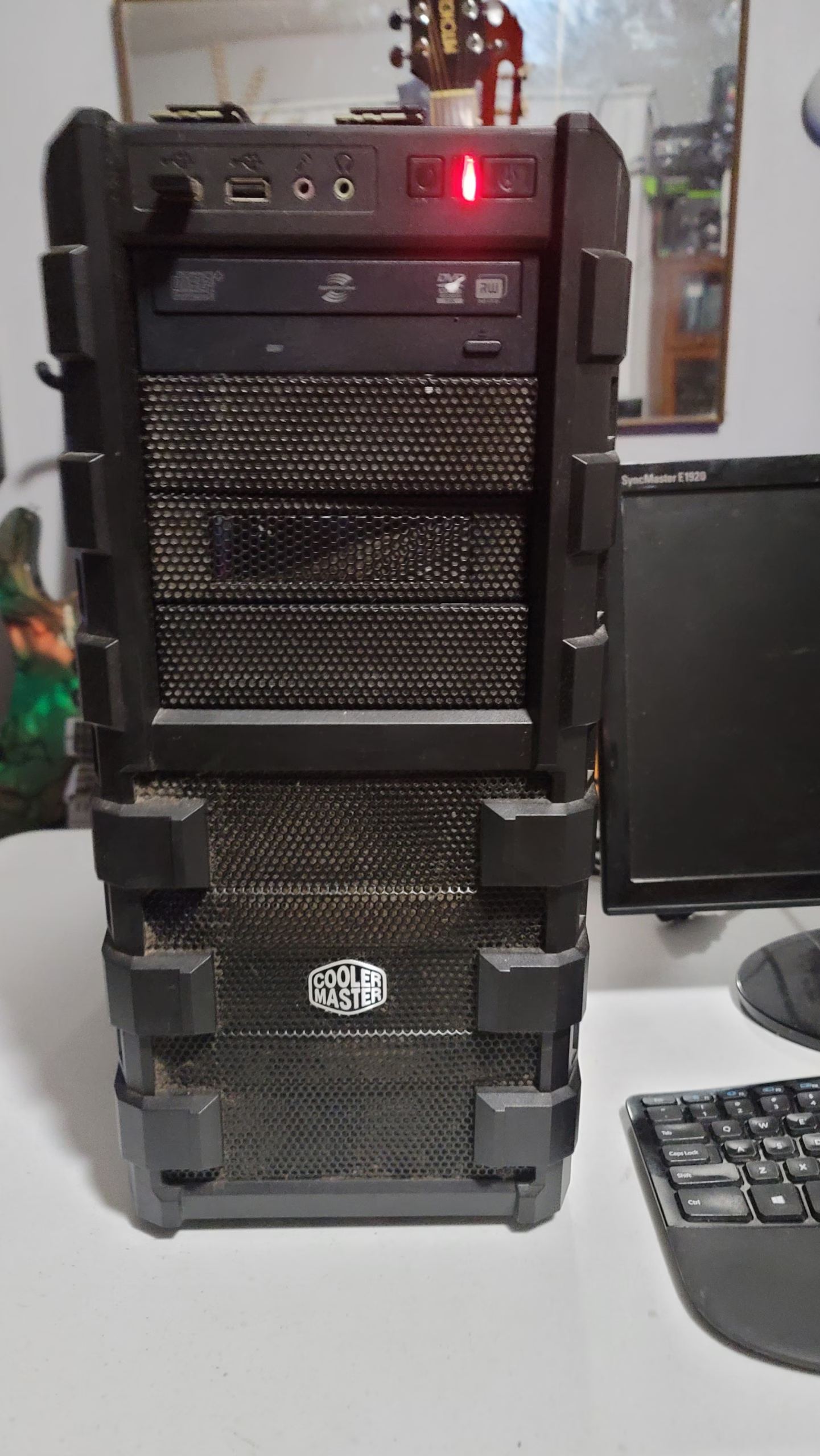
CPU
Intel Core i7-5930K @ 3.50GHz — 6 cores / 12 threads (Haswell-EP)
This is a 2014-era workstation CPU. It’s not the latest and greatest, but for local AI inference, the CPU does most of its work in these areas:
- Loading models into memory
- Preprocessing input text
- Managing the HTTP API endpoints
- Running background processes (monitoring, logging)
The CPU doesn’t do heavy per-token math — that’s the GPU’s job. So an older i7 with 6/12 threads is perfectly adequate.
GPU
NVIDIA GeForce RTX 2070 SUPER — 8 GB VRAM</strong (Turing architecture, Compute Cap 7.5)
The 2070 Super is our centerpiece. At the time of writing, a used 2070 Super costs roughly $250–$300 on the secondary market. The build uses an ASUS X99 Deluxe II ATX motherboard in a Cooler Master Tower case — a full-sized desktop form factor, not a compact mini-PC. The 8 GB of VRAM is the critical number — it determines which models can run entirely on the GPU (fast) versus which need CPU offloading (slower).
Why 8 GB matters:
- Models under ~6 GB can fit entirely in VRAM — blazing fast inference
- Models between 6–10 GB need partial CPU offloading — usable but noticeably slower
- Models over 10 GB need heavy CPU offloading — viable but not ideal
The third category is where the daily driver actually lives: hermes3.6-35b-a3b, the Hugging Face Hermes 3.6 fine-tune of the Qwen36-35B-A3B mixture-of-experts architecture. Its 17.4 GB GGUF is double the card’s VRAM, but only ~3 B parameters are active for any given token — with --cpu-moe keeping the experts in system RAM and attention on the GPU, it holds about 30 tokens per second on this machine. Part 2 has the live numbers.
RAM
48 GB DDR4
48 GB of system RAM gives us plenty of headroom for:
- Large model offloading (Hermes3.6-35B at 17 GB, gpt-oss-20b at 12 GB)
- Model warmup and preloading
- Running multiple models concurrently
- The OS and application overhead
We also have 8 GB of swap space, which serves as a safety net when VRAM fills up.
Storage
- OS Drive: 915 GB SSD (/dev/sda2, 23 GB used)
- Data/Models Drive: 916 GB RAID (/dev/md0p1, 195 GB used)
Models live on the /srv partition. The total model collection is approximately 85 GB across ~15 models at various quantization levels.
Operating System
Ubuntu 24.04 (Linux 6.8.0-147-generic)
We chose Ubuntu for its excellent NVIDIA driver support, Docker availability, and widespread community documentation.
CUDA
CUDA 13.0 with Driver 580.178.04
The NVIDIA driver version 580.178.04 supports CUDA 13.0, which is the latest stable release. This gives us access to the latest optimization features.
Cost Breakdown
| Component | Cost | Notes |
|---|---|---|
| RTX 2070 Super (used) | ~$275 | Secondary market |
| i7-5930K (used) | ~$150 | Old workstation CPU |
| 2 × 32 GB RAM kits | ~$120 | New purchase |
| 915 GB SSD | ~$60 | Budget NVMe |
| Motherboard (used) | ~$80 | X99 board |
| PSU, case, cooling | ~$70 | Existing parts |
| Total | ~$755 | Mostly repurposed hardware |
Actual cash outlay was ~$450 since some parts were reused.
Why This Setup Matters
At ~$450–$755, this is one of the most cost-effective ways to run AI locally. For comparison:
- NVIDIA DGX Spark: $6,949.99 (Micro Center); $4,699.99 (company purchase)
- RTX 4090 (new): $2,755–$3,217
- RTX 4090 (used): $2,150–$3,010
- Cloud A100 (hourly): $3–$5/hour
Our 2070 Super costs about $150/year to own (amortized over 5 years, replacement cost) and uses roughly 30 W at idle, 120 W average, 215 W max. At $0.19/kWh, that’s about $95/year in electricity (or ~$8/month average).
For a user running 200–500 requests per day, the cost per 1K tokens drops to less than $0.04 — competitive with many cloud providers and keeps your data local.
What’s Next
In Part 2, we’ll cover the software stack: Ubuntu installation, CUDA setup, Python environments, and why we chose llama.cpp with GGUF models over PyTorch for local inference.
Based on actual AI Inference Server deployment data from October 2026.
Part 1: The Hardware Build · Part 2: Software Stack · Part 3: Model Selection · Part 4: Memory Optimizations · Part 5: API Endpoint · Part 6: Monitoring & Metrics · Part 7: Cost Analysis